ACP Java SDK: Building IDE Agents in Java
ACP standardizes how code editors talk to AI agents — LSP for the agent era. The Java SDK gives you annotations, a sync API, and in-memory testing. Here's what the programming model looks like.
AI coding agents are multiplying. Cursor, Windsurf, Trae, Void, Claude Code, Gemini CLI — every one needs a custom plugin for every editor. That's M agents × N editors, the same combinatorial explosion that plagued language tooling before LSP. Developers who want to write an agent face a choice: pick one IDE and lock in, or maintain N integrations.
LSP solved this for languages with a standard protocol. ACP — the Agent Client Protocol — does the same for AI agents.
The ACP ecosystem already had SDKs in Python, TypeScript, Rust, and Kotlin — built by the Zed and JetBrains teams who co-created the protocol. Java was missing. So I built it.
This post shows you what the programming model looks like and what people are already building with it.
TL;DR: ACP standardizes IDE↔agent communication the way LSP standardized language servers. The Java SDK gives you three API styles (annotations, sync builder, async/reactive),
SyncPromptContextfor agent-to-IDE interaction, and in-memory testing without subprocesses. One JAR works in JetBrains, Zed, and VS Code. The 30-module tutorial takes you from echo agent to IDE integration.
The M×N Problem
LSP's fix was structural: each language implements one server, each editor implements one client. M + N integrations instead of M×N. ACP applies the same fix to agents.
The protocol runs JSON-RPC 2.0 over stdio (the spec-defined transport). Created by Zed and Google (August 2025), with JetBrains joining as co-developer in October 2025 and Cursor joining the ACP Registry in March 2026. The ACP registry already lists 30+ agents and 4+ IDE clients. Each agent implements one ACP server. Each editor implements one ACP client.
Where does ACP sit relative to other protocols? ACP handles IDE ↔ Agent communication. MCP connects agents to external context — tools, data sources, APIs. They're complementary layers: an agent can be an ACP server to the IDE and an MCP client to its context sources.
The Programming Model
The SDK gives you three API styles for building agents. All three produce identical protocol messages. Here's the same minimal agent in each style.
Annotation-based
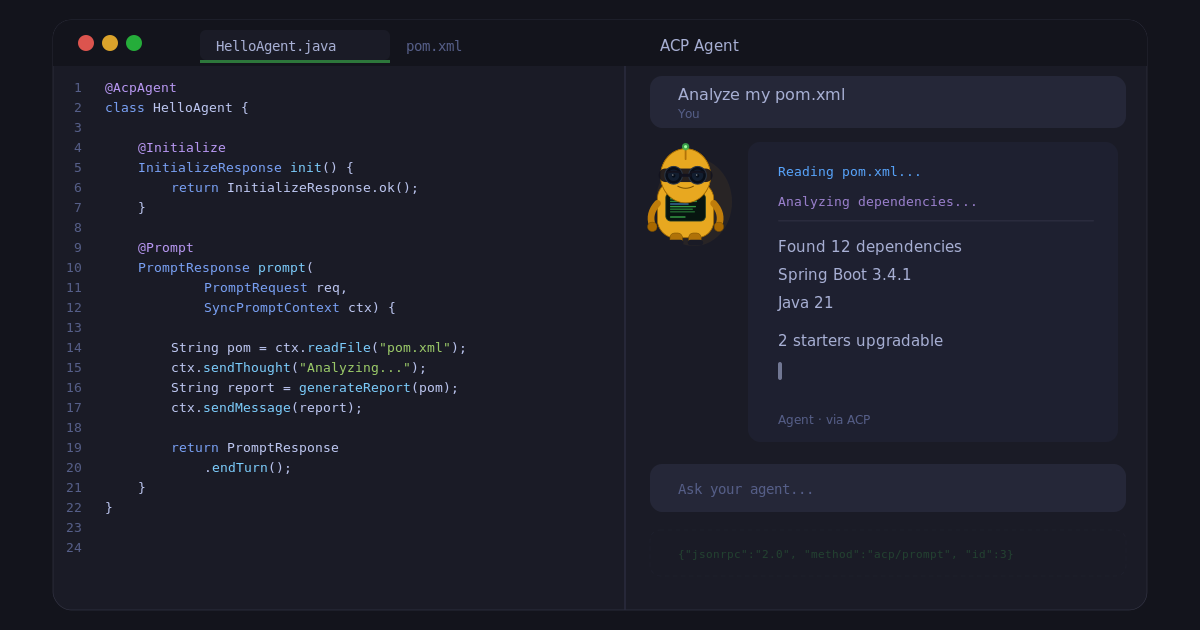
The least boilerplate. If you've used Spring MVC, the shape is familiar: @AcpAgent → @Controller, @Prompt → @RequestMapping, SyncPromptContext → the agent's window into the IDE.
@AcpAgent
class HelloAgent {

    @Initialize
    InitializeResponse init() {
        return InitializeResponse.ok();
    }

    @NewSession
    NewSessionResponse newSession() {
        return new NewSessionResponse(UUID.randomUUID().toString(), null, null);
    }

    @Prompt
    PromptResponse prompt(PromptRequest req, SyncPromptContext ctx) {
        ctx.sendMessage("Hello from the agent!");
        return PromptResponse.endTurn();
    }
}

// Bootstrap and run
AcpAgentSupport.create(new HelloAgent())
    .transport(new StdioAcpAgentTransport())
    .run();
Method signatures are flexible. Parameters are auto-resolved. Return types convert automatically — a String return from a @Prompt method auto-converts to PromptResponse.
Sync builder
Explicit control, no annotations.
var transport = new StdioAcpAgentTransport();

AcpSyncAgent agent = AcpAgent.sync(transport)
    .initializeHandler(req -> InitializeResponse.ok())
    .newSessionHandler(req ->
        new NewSessionResponse(UUID.randomUUID().toString(), null, null))
    .promptHandler((req, context) -> {
        context.sendMessage("Echo: " + req.text());
        return PromptResponse.endTurn();
    })
    .build();

agent.run();
Async/reactive
For reactive applications using Project Reactor.
var transport = new StdioAcpAgentTransport();

AcpAsyncAgent agent = AcpAgent.async(transport)
    .initializeHandler(req -> Mono.just(InitializeResponse.ok()))
    .newSessionHandler(req -> Mono.just(
        new NewSessionResponse(UUID.randomUUID().toString(), null, null)))
    .promptHandler((req, context) ->
        context.sendMessage("Hello from the agent!")
            .then(Mono.just(PromptResponse.endTurn())))
    .build();

agent.start().then(agent.awaitTermination()).block();
Annotations for least boilerplate. Sync for explicit control. Async for reactive composition. Pick the one that fits your application.
SyncPromptContext — The Agent's Window Into the IDE
The interesting work happens inside the @Prompt handler.
The key abstraction is SyncPromptContext — it gives the agent a live connection to the IDE's workspace. The agent says "read this file" and the IDE provides the content. The agent says "run this command" and the IDE decides whether to execute it. Every operation flows through the IDE, not around it.
Here's what that looks like in practice:
@Prompt
PromptResponse analyze(PromptRequest req, SyncPromptContext ctx) {
    // Read a file — the IDE provides the content
    String pom = ctx.readFile("pom.xml");
    ctx.sendThought("Analyzing dependencies...");

    // Ask permission — the IDE prompts the user
    if (ctx.askPermission("Create analysis report")) {
        ctx.writeFile("analysis.md", generateReport(pom));
    }

    // Run a command — the IDE executes it
    CommandResult result = ctx.execute("./mvnw", "compile");
    ctx.sendMessage("Build " + (result.exitCode() == 0 ? "passed" : "failed"));
    return PromptResponse.endTurn();
}
The full convenience API surface: sendMessage, sendThought, readFile, writeFile, askPermission, askChoice, execute. Each method is a blocking call that sends a JSON-RPC request to the IDE and waits for the response.
Testing Without an IDE
The SDK ships an acp-test module with InMemoryTransportPair — a bidirectional in-memory transport that connects a client and agent without subprocesses, stdio, or real I/O.
var pair = InMemoryTransportPair.create();

// Agent side
AcpAsyncAgent agent = AcpAgent.async(pair.agentTransport())
    .initializeHandler(req -> Mono.just(InitializeResponse.ok()))
    .newSessionHandler(req ->
        Mono.just(new NewSessionResponse("s1", null, null)))
    .promptHandler((req, ctx) ->
        ctx.sendMessage("Echo: " + req.text())
            .then(Mono.just(PromptResponse.endTurn())))
    .build();
agent.start().subscribe();

// Client side
AcpSyncClient client = AcpClient.sync(pair.clientTransport()).build();
client.initialize();
client.newSession(new NewSessionRequest(".", List.of()));
var response = client.prompt(new PromptRequest("s1",
    List.of(new TextContent("hello"))));

assertThat(response.stopReason()).isEqualTo(StopReason.END_TURN);
258 tests in the SDK use this approach. Fast, deterministic, no flaky CI. You test the full protocol lifecycle — initialize, session, prompt, response — without launching a process or connecting to a real IDE.
One JAR, Three IDEs
The same agent JAR works in JetBrains, Zed, and VS Code. Only the configuration differs.
Zed (settings.json):
{
  "agent_servers": {
    "My Agent": {
      "type": "custom",
      "command": "java",
      "args": ["-jar", "/path/to/agent.jar"]
    }
  }
}
JetBrains (~/.jetbrains/acp.json):
{
  "agent_servers": {
    "My Agent": {
      "command": "java",
      "args": ["-jar", "/path/to/agent.jar"]
    }
  }
}
VS Code (community extension formulahendry.acp-client):
{
  "acp.agents": {
    "My Agent": {
      "command": "java",
      "args": ["-jar", "/path/to/agent.jar"]
    }
  }
}
| IDE | Configuration | How it finds your agent |
|---|---|---|
| Zed | settings.json — command + args |
Explicit in settings |
| JetBrains | ~/.jetbrains/acp.json — command + args |
Explicit in config file |
| VS Code | VS Code settings — acp.agents |
Community extension acp-client |
VS Code doesn't have native ACP support yet (tracked in Issue #265496). The community extension fills the gap.
The Bottom Line
- ACP is LSP for AI agents. Open protocol, created by Zed and Google, co-developed with JetBrains, growing ecosystem. One agent works in multiple IDEs.
- The Java SDK gives you three API styles. Annotations (least code), sync builder (explicit), async (reactive). Same protocol output.
SyncPromptContextis the core abstraction. The agent reads files, writes files, asks permission, runs commands — all through the IDE. The IDE controls what's allowed.- Test agents in-memory.
InMemoryTransportPairgives you fast, deterministic tests without subprocesses or real IDEs. - The 30-module tutorial covers the full path. Client basics, agent development, streaming, testing, capability negotiation, IDE integration.